
Collective.

/Services / AI & Innovation

AI automation and consultancy that solves real business problems

We find the repetitive, disconnected or manual parts of a business and work out where automation or AI can genuinely make them better, then build the system around the real workflow.

That might be a workflow automation, an integration between the tools you already use, an internal dashboard or an AI-assisted step where AI actually adds value.

From content systems and operational platforms to integrations and AI-assisted workflows, our automation work sits alongside our wider digital experience builds.

That means the automation can connect to the website, the customer journey and the systems behind them, rather than sitting on its own.

Based in Liverpool or the North West? Find out how we plan and build AI and automation for Liverpool businesses.

What we actually build

Practical systems that take repetitive work off people and move information to where it's needed.

Workflow Automation

Connecting repeated tasks so less needs doing manually.

Seen in: Abba Cakes order handling, Iceland production scripts

Alerts & Monitoring

Systems that watch for information or changes and flag what needs attention.

Seen in: Cobleys Solicitors legal news monitoring

Internal Tools & Dashboards

Giving teams one clear view of their information and operational workflows.

Seen in: Abba Cakes order management, NEB admin approvals

Integrations

Connecting websites, ecommerce platforms, APIs and business systems.

Seen in: Abba Cakes WooCommerce and Square

Customer & Enquiry Workflows

Improving how enquiries and submissions are captured, prioritised and moved through a business.

Seen in: Abba Cakes enquiries, NEB screening submissions

Content Workflows

Automation that supports content planning and production admin.

Seen in: Cobleys content system, Iceland file preparation

Data Handling

Moving, structuring and surfacing information between systems.

Seen in: NEB platform data, Abba Cakes order data

AI-assisted Workflows

Using AI models to classify, summarise, draft or route information, inside a wider workflow and only where they genuinely help.

How an automation project starts

Not every automation needs AI. Sometimes a straightforward integration or a rule-based system is the better answer, and we'll tell you when it is.

  1. 01

    Find the friction

    We identify the repetitive, manual or disconnected parts of the workflow, and who they slow down.

  2. 02

    Work out what's worth changing

    We weigh up value, complexity and risk, and whether AI is needed at all or a simpler approach will do.

  3. 03

    Define the system

    We map the workflow, the data, the integrations and the outcome the system should deliver.

  4. 04

    Build & connect

    We build the automation, tool or system and connect it to your existing software where appropriate.

  5. 05

    Test

    We check edge cases, reliability and how your team actually uses it day to day.

  6. 06

    Improve

    We review what's working and refine it once it's in real use.

Business problems automation can solve

Most useful automation starts with a familiar problem. Some of these need AI; many don't.

  • Repetitive admin

    Usually automation

    Information re-keyed or tidied by hand. Automating the repeat steps so people only deal with the exceptions.

  • Enquiry handling

    Automation, AI can help sort

    Enquiries arriving in different places with no clear priority. Bringing them into one place and prioritising them by urgency or type.

  • Monitoring changes

    Usually automation

    Someone keeps checking for news, updates or changes. Watching the sources that matter and flagging what needs attention.

  • Internal alerts

    Usually automation

    Important events get missed until someone notices. Notifying the right person when something needs action.

  • Content workflows

    Automation, AI can help draft

    Finding timely topics or preparing files takes too long. Surfacing ideas and automating the repetitive prep.

  • Customer follow-up

    Usually automation

    Follow-ups depend on someone remembering. Triggering the next step when something happens.

  • Operational dashboards

    Custom tool

    No single view of what's happening. A dashboard that pulls the information together from the systems you already use.

  • Routing data between systems

    Integration

    The same information copied from one tool to another. An integration that moves it automatically.

  • Summarising information

    AI-assisted

    Long messages, documents or reports need reading before anyone can act. AI-assisted summaries, checked by a person, where the volume justifies it.

  • Internal knowledge and search

    Custom tool, AI can help

    Answers buried in documents and inboxes. A searchable knowledge base, with AI search where it genuinely helps.

  • Repetitive reporting

    Usually automation

    Reports rebuilt by hand every week or month. Pulling the data automatically into a consistent format.

Systems we've built

None of these needed AI to be useful. They show the kind of connected systems we design and build.

Cobleys Solicitors website

Monitoring and content system

Cobleys Solicitors

The friction
A Liverpool criminal defence firm needed a modern website and a steady supply of timely, relevant topics to comment on across the legal sector.
What we built
Alongside a full website rebuild, a system that monitors legal news and case coverage through Google Alerts aligned to the firm's services, surfacing topics for commentary and feeding its LinkedIn and Instagram content.
What changed
A more proactive approach to visibility and thought leadership, with the website part of a wider digital system rather than a static brochure.

Read the Cobleys Solicitors case study
Abba Cakes website

Ecommerce and operations platform

Abba Cakes

The friction
Orders, enquiries and customer communication were spread across multiple systems, and the website had become slow and difficult to manage.
What we built
A headless Next.js storefront with WooCommerce as the engine and Square at checkout, plus a bespoke order management platform that pulls in WooCommerce orders and enquiries, prioritises them by urgency and fulfilment date, and suggests production and booking schedules.
What changed
One centralised system for the team to manage orders, prioritise workloads and improve communication, and a faster ordering experience for customers.
Read the Abba Cakes case study
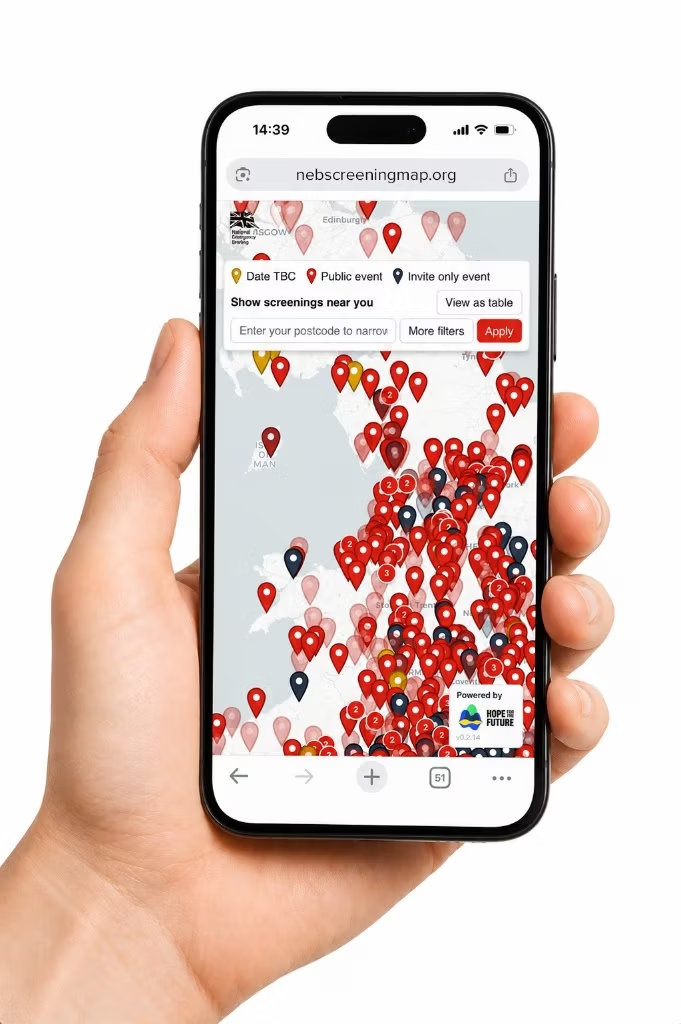
NEB screening map on mobile

Submissions and admin platform

National Emergency Briefing

The friction
A nationwide film campaign had no system to register screenings, visualise activity, connect organisers or understand the scale of engagement.
What we built
An interactive screening platform with user submission flows, admin approval, anonymous messaging between organisers, international pins and map clustering for scale.
What changed
Over 500 user-submitted screenings registered, with the NEB team getting a clear, real-time view of activity.
Read the National Emergency Briefing case study

Why Collective for AI and automation

Business problem first

We start with the workflow and what's slowing it down, then choose the technology. Sometimes that means recommending something simpler than AI.

Connected to the customer experience

We already build websites, ecommerce, content and internal systems, so automation can connect the front end to the operations behind it instead of sitting in isolation.

Custom development

We design and build bespoke platforms and integrations, not just configure off-the-shelf tools.

Creative and technical together

The people thinking about how a system looks and feels work alongside the people building it.

Senior involvement

A small team with senior people hands-on, from the first conversation to the build.

Not tied to one platform

We choose tools per project, whether that's an automation platform, an API, custom code or an AI model, rather than selling one product.

Data, access and privacy

Before we build anything, we look at what information the workflow actually needs, where it lives and who should have access to it.

Systems should only use the data they need to do the job. Where an AI model is involved, we agree up front what information, if any, is passed to it.

The right privacy and security approach depends on the workflow and the platforms involved, so we work through those requirements with you while defining the system, not after it's built.

Frequently asked questions

Get in touch
  • It takes on the repetitive, predictable work between people and systems: moving information between tools, prioritising enquiries, flagging changes that need attention, pulling reports together and preparing first drafts. Used well, the result is fewer manual steps, faster responses and a clearer view of what's happening, with people still making the decisions that matter.

  • We look for tasks that are frequent, repetitive and rule-based, or that cause delays when information has to pass between people or systems. Then we weigh the value of changing them against the complexity and risk. The best first candidates are usually small, well understood and done often.

  • Yes, where a custom system is the right answer. We design and build bespoke platforms, dashboards and integrations, and add AI models to them where they genuinely help, for example to classify, summarise or draft. Where an existing tool or a simpler automation will do the job, we'll recommend that instead.

  • Usually, yes. Much of the value comes from connecting the tools you already use. For Abba Cakes, we built an order management platform that pulls orders directly from WooCommerce. When the workflow starts on your website or online shop, our website and ecommerce work connects the two.

  • No, and it shouldn't be. Plenty of useful automation is rule-based: when this happens, do that. AI is useful when the work involves interpreting unstructured information, such as free-text messages or documents. We'll tell you which approach fits, including when a straightforward integration is the better answer.

  • It depends on the scope: how complex the workflow is, which systems are involved, the integrations needed, the state of your data and how much custom development is required. A small, focused automation is scoped very differently from a custom platform. We'll give you a clear proposal once we understand the problem.

  • It depends on the same factors as cost. A single automation connecting two tools is a very different job from a custom platform with several integrations. Once we've defined the system, we'll give you a realistic timeline.

  • We start by working out what information the workflow actually needs, where it's stored and who should have access. Systems should only use the data they need. The right privacy and security approach depends on the workflow and the platforms involved, so we work through those requirements with you before anything is built.

  • Yes, and it's often the best way to start. A pilot on one well-defined workflow lets you see how the approach works in practice, with your team and your data, before deciding whether to go further.

Start a project

Show us the repetitive bit.

If there's a task, workflow or hand-off everyone keeps doing manually, start there. We'll work out whether it needs AI, automation, an integration or something simpler.